
今天要將資料庫裡的書籍資料,透過 PHP 渲染成前端 HTML 網頁,打造出使用者能「看得到、互動到」的 UI 介面。
index.phpindex.php 是整個圖書管理系統的網站首頁與書籍列表展示頁面,它在系統中扮演以下三個核心角色:
index.php。config/database.php,發送 SQL 指令(SELECT)從 MySQL 撈出書籍清單。index.php 經過 htmlspecialchars() 轉義處理,防止惡意指令引發 XSS(跨站腳本攻擊)。在 WSL2 專案目錄下啟動 Claude Code,並下達以下 Prompt:
請幫我在專案根目錄建立 ~/library-system/index.php,作為圖書管理系統的書籍列表首頁:

1. 引進 config/database.php,呼叫 Database::getConnection() 取得 PDO 連線。

2. 撰寫 SQL 查詢 books 資料表的所有欄位(id, title, author, category, available, created_at),並依 id 降冪排序(DESC)。

3. 使用 HTML5 搭配基礎 CSS 樣式,將書籍列表以表格呈現。

4. 所有從資料庫印出的文字欄位必須使用 htmlspecialchars() 包裹以防範 XSS 攻擊。

5. 若無書籍資料,表格區域請顯示「目前尚無書籍資料」。
生成的出來的 index.php:
<?php

require __DIR__ . '/config/database.php';

$pdo = Database::getConnection();

$sql = "SELECT id, title, author, category, available, created_at FROM books ORDER BY id DESC";
$stmt = $pdo->query($sql);
$books = $stmt->fetchAll();

?>
<!DOCTYPE html>
<html lang="zh-Hant">
<head>
<meta charset="UTF-8">
<title>書籍列表 - 圖書管理系統</title>
<style>
    body {
        font-family: "Microsoft JhengHei", Arial, sans-serif;
        background-color: #f5f5f5;
        color: #333;
        margin: 0;
        padding: 2rem;
    }
    h1 {
        text-align: center;
        margin-bottom: 1.5rem;
    }

     table {
        width: 100%;
        max-width: 960px;
        margin: 0 auto;
        border-collapse: collapse;
        background-color: #fff;
        box-shadow: 0 1px 3px rgba(0, 0, 0, 0.1);
    }
    th, td {
        padding: 0.75rem 1rem;
        text-align: left;
        border-bottom: 1px solid #ddd;
    }
    th {
        background-color: #2c3e50;
        color: #fff;
    }
    tr:hover {
        background-color: #f1f1f1;
    }

    .empty {
        text-align: center;
        padding: 2rem;
        color: #777;
    }
</style>
</head>
<body>
    <h1>書籍列表</h1>
    <table>
        <thead>
            <tr>
                <th>ID</th>
                <th>書名</th>
                <th>作者</th>
                <th>類別</th>
                <th>可借數量</th>
                <th>建立時間</th>
            </tr>
        </thead>
        <tbody>
<?php if (empty($books)): ?>
            <tr>
                <td class="empty" colspan="6">目前尚無書籍資料</td>
            </tr>
<?php else: ?>
<?php foreach ($books as $book): ?>
            <tr>
                <td><?= htmlspecialchars($book['id']) ?></td>
                <td><?= htmlspecialchars($book['title']) ?></td>
                <td><?= htmlspecialchars($book['author']) ?></td>
                <td><?= htmlspecialchars($book['category']) ?></td>
                <td><?= htmlspecialchars($book['available']) ?></td>
                <td><?= htmlspecialchars($book['created_at']) ?></td>
            </tr>
<?php endforeach; ?>
<?php endif; ?>
        </tbody>
    </table>
</body>
</html>
接著在專案目錄下 ~/library-system 執行以下指令啟動 PHP 內建 Web 伺服器:
php -S 127.0.0.1:8000
開啟瀏覽器輸入網址:
http://localhost:8000
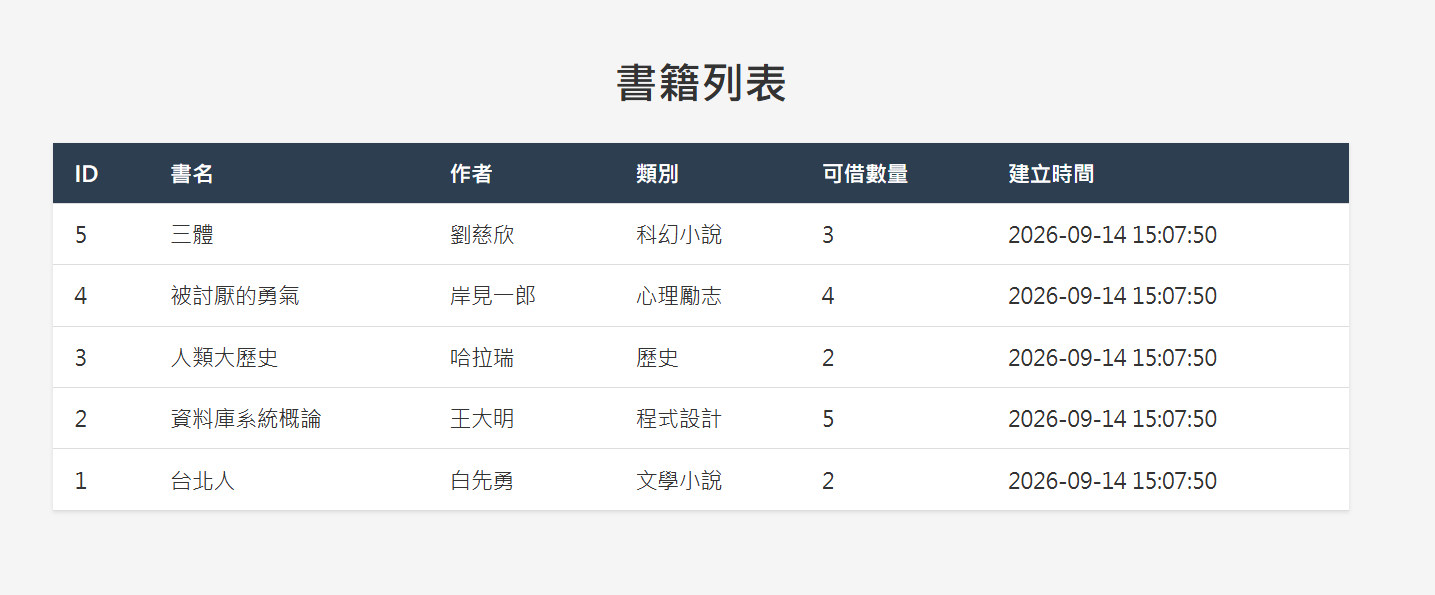
出現以下畫面表示測試成功:



 iThome鐵人賽
 看影片追技術